
I’m trying to output custom text in the confirmation message on submit of the form.
This is the syntax I’m using in the editor:
<<[Condition:’<<[DocumentStage]>>’ == ‘1_Admin’:An email has been sent to the broker.]>>
<<[Condition:’<<[DocumentStage]>>’ == ‘2_Broker’:Your acknowledgement form has been sent to your regional manager for sign off.]>>
<<[Condition:’<<[DocumentStage]>>’ == ‘3_RegionalManager’:The acknowledgement form has been sent to the general manager for final sign off.]>>
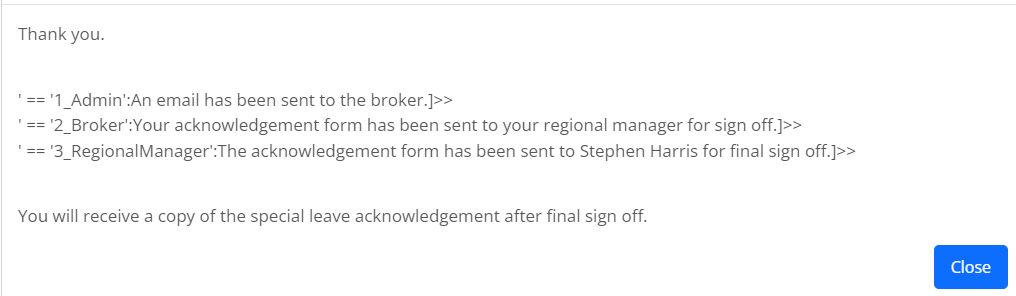
Below is a screenshot of output on submit of the first stage (1_Admin) - all conditional options are being output with some of the conditional syntax:
Is the syntax incorrect, or is not possible to have conditional statements in the Confirmation type editor?
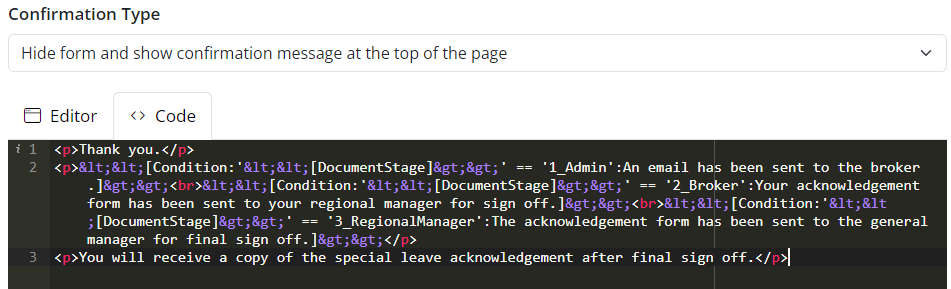
Not sure if this is relevant - the conditional syntax was added directly into the editor. When previewing the code, the angle brackets “<”, “>” had been converted to html entities:
1 Answers
The Confirmation Editor only supports tag replacement, it doesn’t evaluate expressions.
You’d need to use a hidden formula field for your expression(s), then refer to that with a tag in the Confirmation Editor.